Search Marketing Group, a leading digital marketing agency dedicated to assisting small businesses in Australia, stands out for its innovative and effective strategies. With a commitment to helping clients thrive in the digital landscape, the agency has become a trusted partner for businesses seeking to enhance their online presence.
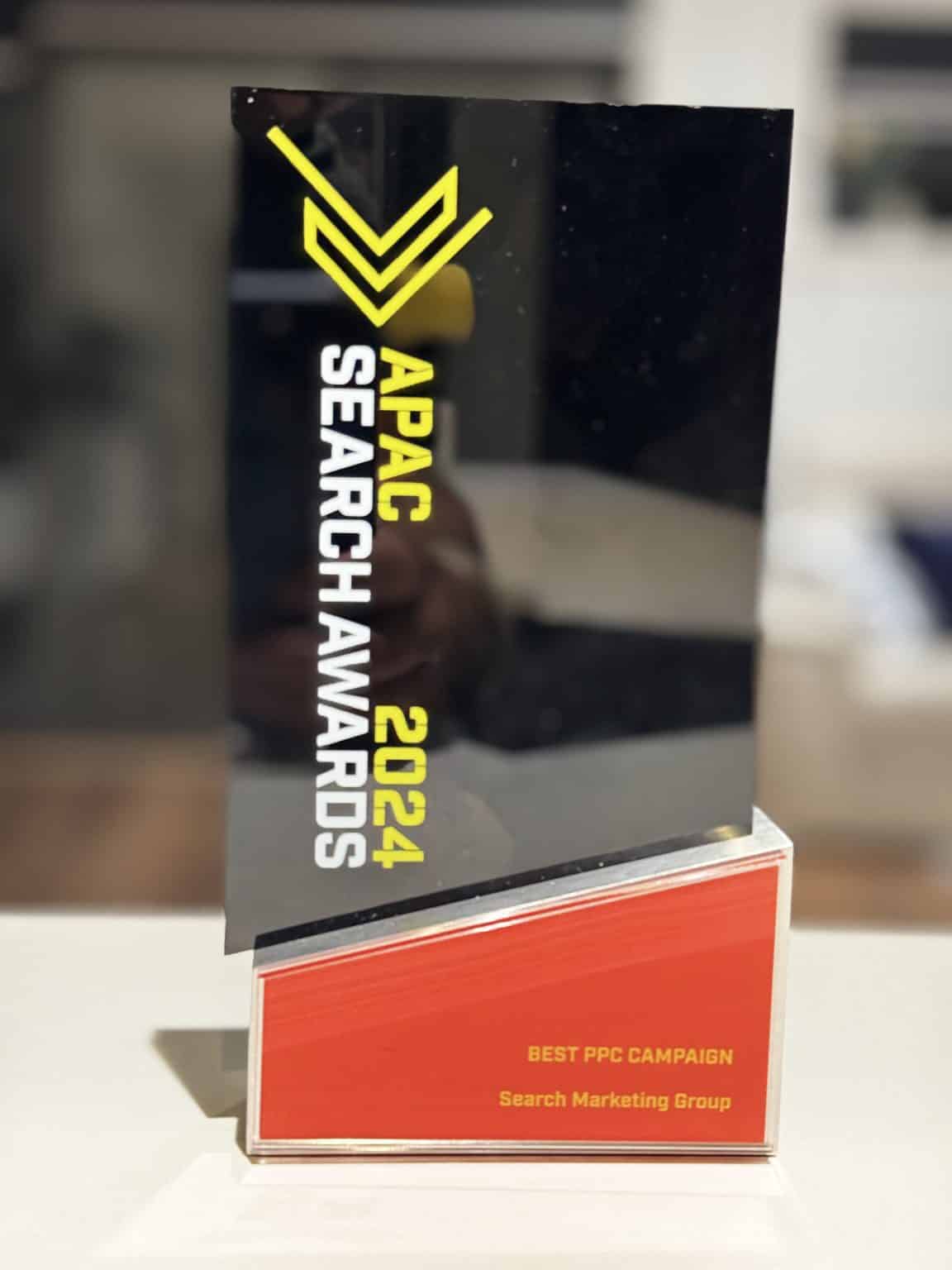
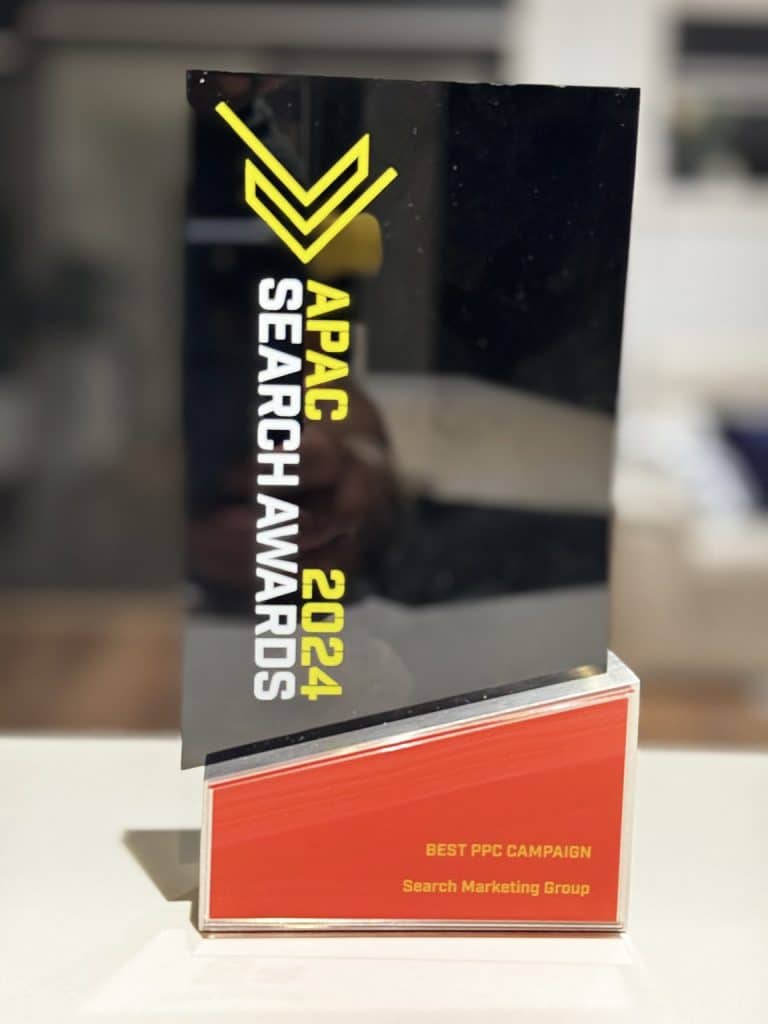
We are proud of our victory at the APAC Search Awards for the Best PPC Campaign. This accolade not only showcases the agency’s expertise in Pay-Per-Click advertising but also highlights its dedication to delivering outstanding results for clients. The award reflects Search Marketing Group’s commitment to excellence in the dynamic field of digital marketing, reinforcing its position as a reliable and forward-thinking partner for small businesses aiming to navigate and succeed in the competitive online market.
Our Victorious Goals:
Search Marketing Group sets ambitious goals in the realms of SEO and Google Ads, aiming to redefine digital marketing success for its clients. With an unwavering commitment to excellence, the agency strives to elevate brands through cutting-edge SEO strategies, ensuring enhanced visibility and organic growth. Simultaneously, our Google Ads initiatives focus on precision and innovation, maximising client ROI through targeted campaigns. By pushing the boundaries of what’s achievable in the dynamic digital landscape, Search Marketing Group consistently demonstrates a forward-thinking approach, solidifying its reputation as a trailblazer in the industry, dedicated to realising and exceeding ambitious goals for the businesses it serves.
Delivered Outstanding Results:
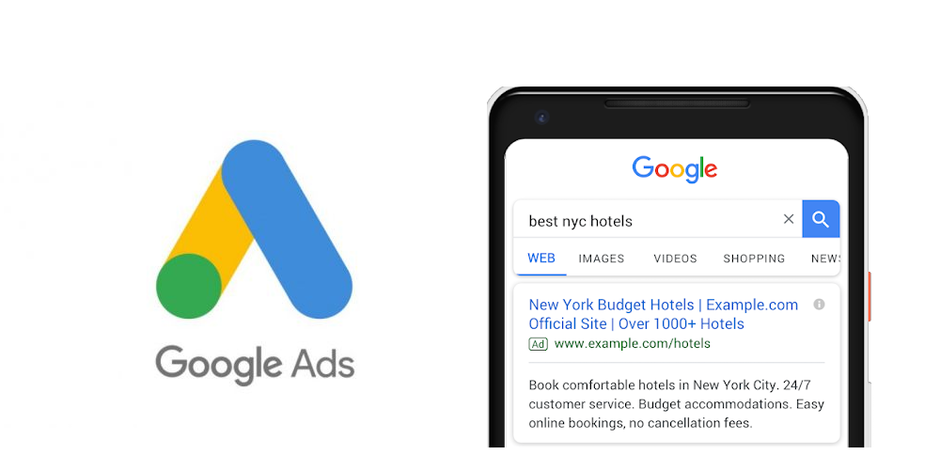
The winning Google Ad campaign excels with a comprehensive strategy, combining strategic precision and tailored relevance. We created engaging and informative ad content, deploying ad extensions strategically for valuable information. Geo-targeting ensures precise reach, while mobile responsiveness caters to on-the-go users. Robust remarketing strategies re-engage and convert interested users. Rigorous analytics, continuous testing, and effective budget management ensure cost-efficiency, and an optimised post-click experience and personalised ad content drive high lead generation and conversion rates, ensuring the success of the Google Ad campaign.
The Campaign in Numbers:
The conversion rate surged by 34.2%, reaching 17.45%.
The total revenue generated amounted to $178.36K.
CPL decreased to $25.11.
Conversions witnessed an impressive 102% increase, reaching 7.10K.
The Click-Through Rate (CTR) experienced growth, reaching 6.49%.
This campaign exemplifies the formidable influence of Google Ads in propelling considerable business growth, setting a groundbreaking standard for what can be achieved in the realm of digital marketing.
At Search Marketing Group, we are enthusiastic about advancing our growth journey and providing measurable results that drive our clients’ businesses forward.
Looking forward, our commitment to forging market leaders remains unwavering. Through integrating modern technology, creative expression, and data-driven insights, Search Marketing Group is devoted to continuous innovation, learning, and ensuring sustained long-term business growth for our clients.
Now’s a great time to be in eCommerce. But it also means that everyone is jumping on the bandwagon. How can you make sure that your online store gets seen in the mix?
Enter eCommerce SEO.
In this guide, we’ll show you what eCommerce SEO is, why it’s so crucial for your online business, and how you can get started with some eCommerce best practices.
What is eCommerce SEO?
E-commerce SEO is how you make sure that your online store is visible to potential buyers on the results page of a search engine. This means that when someone searches for a particular product or product type, they’ll see your store before anyone else.
Is SEO important for eCommerce?
SEO is vital for any eCommerce business – especially if you’re selling the same products as your competitors. You’ll lose a sale if your products don’t rank on the first page or rank below your competitors on the first page. It’s as simple as that.
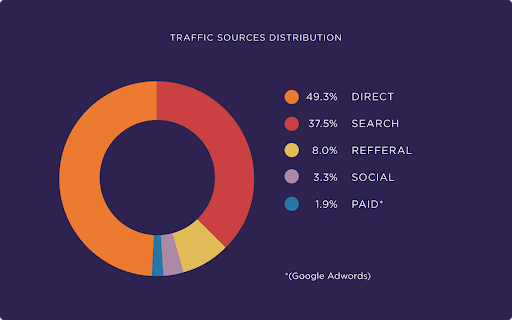
In fact, 37.5% of all traffic to eCommerce sites comes from searches. This means that if your site is not optimized, you could be losing out on over a third of the sales you could be bringing in.
Apart from sales, eCommerce SEO can also decrease the amount you have to spend on paid ads, allowing you to lower your cost per customer acquisition.
How to increase your web traffic with eCommerce SEO
Start with keyword research
Like any solid SEO strategy, you need to find keywords that you can rank for – and that get enough volume every month. You can refer to our more comprehensive keyword research guide for more details on how to get started.
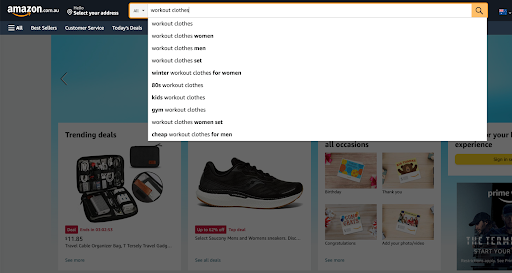
Amazon is full of buyer-intent keywords in your niche. All you have to do is type your products and any variations that you can think of in the search bar, and it will give you a range of keywords that people are searching for.
Say I sell workout clothes. These are all the different keywords when I type ‘workout clothes’ into the search bar.
These searches also tend to be long-tail keywords, which are far less competitive and convert far better.
When choosing keywords, you’ll want to evaluate them by:
How many people are searching for them
Whether the keywords have a lot of competition to rank
Whether the keywords related closely to what you sell
You want to keep two things in mind: scalability and navigation.
Your site should be simple enough that you can scale it up as you release new products in your online store. This means you won’t have to redesign it too soon.
You also want to ensure that it is easy to navigate for a user. As a general rule, you should never be more than three clicks away from the homepage. If you have any more than this, chances are your structure is a bit too complex and confusing.
Tackle on-page eCommerce SEO
Title tags
Your title gets a buyer to click through and choose your product. It needs to be a good one and well-optimized for search.
Make sure to include your main keyword and that your title is no longer than 60 characters. You may also wish to have words like cheap, best, online, or details like free shipping.
Meta description
While Google can pull a description from your site, writing a unique report for every page is always best. And yes, that includes your product and category pages.
Your description does not affect your SEO – but it does affect whether or not people click. For best results, ensure your description is between 50 and 160 characters and includes your main keyword and a call to action.
Product and category pages
As a general rule, pages should:
Be longer than 1000 words
Include your primary keyword 3-5 times
Include related keywords (semantic keywords) your buyers may search for
Now, you might be thinking that it’ll be impossible to make your pages that long. This is why we suggest prioritizing your top 10-15 pages.
It’s worth noting that although many in the SEO world say duplicate content is harmful to your ranking, Google’s John Mueller confirmed that e-commerce pages could include repeated content like product descriptions or specifications.
However, you’ll want to produce enough unique content to ensure that you answer the buyer’s questions and that the reader is not constantly rereading the same information.
Internal links
Linking to pages with high authority – say, popular blog posts or pages that get a lot of traffic – can pass that authority to new pages. You can find out more about linking here.
That’s a lot of work! What if I don’t have time for it all?
You can take all these steps or hire an experienced eCommerce SEO agency. This will ensure you get the best results and can focus more on growing your eCommerce business.
Hire an e-commerce SEO agency today.
At Search Marketing Group®, we can create a powerful SEO strategy for your eCommerce website and help you get seen.
We all want to be recognized for our hard work. For businesses, that recognition comes in the form of the coveted 5-star rating.
Everyone wants five stars to call themselves a 5-star business. Who wouldn’t? But unfortunately, it takes more than being good at what you do to get there.
If you’re wondering why you haven’t got more reviews or how to get 5-star reviews for your business, look no further. In this guide, we’ll show you exactly how to get 5-star ratings on Google, Facebook, and any other review platform.
Let’s get started!
The power of 5-star reviews
You know that five stars are good and 1 star-reviews are bad. And while it’s easy to take it personally as a comment on the quality of your business, reviews have far more power than we often realize.
It all boils down to this:
Humans are inherently social creatures. Therefore, we care A LOT about what other people think.
This is so ingrained in our psyches that 48% of people won’t even look at a business with less than 4 stars.
Of course, there is a delicate balance. Having all 5 stars can look too perfect, meaning businesses want to aim for a 4.7 or 4.9 average. It also means that the odd one or 3-star review won’t kill your business, so you can take a breath if you’ve been worried about that negative commenter who seems to have it out for you.
But at the end of the day, the more 5-star ratings, the better. So we’ll show you how to start bringing those reviews in droves.
How to get 5-star Google reviews
Not only do reviews account for 15% of your local SEO ranking, but they are also apparent.
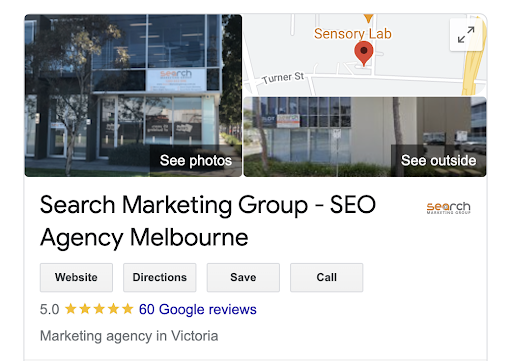
As you can see below, our Google rating appears under our business when a potential customer searches for the ‘Search Marketing Group®.
Thankfully, we’ve brought in quite a few stars with our commitment to service. But if your customers are a little less happy…
…Well, it’s safe to say that your future customers will know about it.
So how can you make sure you get positive ratings? Here’s how you can get more 5-star Google reviews.
Keep doing what you’re doing – excellent work!
A quick note: before you can get a 5-star review, you need to give the customer something worth reviewing. You’re already delivering amazing products/services and customer service, so you should be covered.
But just in case, do a quick assessment of your business. Are there any areas where you could improve to generate more positive feedback? Have you received negative feedback on certain aspects of your business that you could take into consideration?
Of course, you’ll want to be careful with this. Many bad reviews out there tend to be fake, but it’s always worth considering the opinion of someone expressing genuine concern or letdown.
Ask every customer for a review.
What is the most reliable way to get 5-star reviews? Just ask.
Well, you can only ask for A review. But chances are you have a lot of satisfied customers who just aren’t taking the time to leave a review after their experience.
In fact, 70% of customers will be thrilled to leave a review for a business when asked.
So how do you go about it?
If you sell online or collect emails, simply send a follow-up email. Depending on the type of business you are in, you may want to send one immediately, or you may want to give people time to try and love your offering first. The choice is yours.
You can also put the call out on your social media accounts and display your request in-store.
Make it easy for customers to give you reviews.
Sure, most customers are happy to give you reviews. But they won’t jump through hoops to do it, so you want to make the process as easy as possible.
You can do this in several ways, including creating a custom link that sends customers straight to your reviews. Here’s how to create a custom Google review link.
You may also want to create a custom QR code for people on mobile devices and display these in your store, marketing material, and packaging.
Respond to reviews – even the negative ones.
Responding to reviews allows you to show appreciation for those who have left reviews and encourage others to follow suit.
And who knows? You might transform that 2-star rating into a 4 or 5-star with excellent customer service!
Apart from getting you more 5-star reviews, responding to reviews also helps boost your SEO, so this is a must.
Provide incentives
Some customers may love sharing their opinions or want to show their support, but others may need more prompting. There is a range of incentives that have been proven to work on customers, including:
Receiving a product free of charge. While this may not be ideal for small businesses, perhaps you have a small item in stock that you could use or a service you could add on top for a customer.
Receiving a product before everyone else. Those willing to give reviews are often your biggest supporters. Tempt them with a new item in stock that hasn’t been sold to your general public yet, and they’ll feel unique and valued.
Discounts with your store or brand. Everyone loves getting a deal. This is one of the most typical incentives businesses use – for good reason. You get a review and another purchase, with hopefully more to come. Consider offering a 5-10% voucher for anyone who gives you a review or something like free shipping.
Loyalty points with your store or brand. This may be the most doable for small businesses, as it doesn’t require you to give away stock or price things lower. And it is quite adequate, with 59% of consumers saying they’d be happy to leave a review in exchange for loyalty points. Not to mention that a good loyalty program is a great way to keep customers longer!
How to get 5-star Facebook reviews
As with Google reviews, Facebook reviews are essential to the buyer’s journey. Not only will they be seen by people looking up your business on Facebook, but Facebook pages also often rank on the results page whenever anyone searches for your business.
We can see below that our Facebook page is the second result when searching for Search Marketing Group® our Facebook page is the second result.
And under that result? Our 4.6-star rating.
Now, it is possible to disable ratings for your Facebook. However, this is an excellent opportunity to build trust with your customers and show them that others have received value from your business.
Provided that you can get those 5-star reviews, of course.
Most of the tactics we explored with Google reviews also apply to getting 5-star Facebook reviews. However, some other ways you can get reviews that are more specific to Facebook are explored below.
Make sure your reviews are set up.
Turned your reviews off at some point? Here’s Meta’s guide to turning on Facebook page reviews and ratings.
Ask customers to check in.
Facebook prompts people who have checked into a place to leave a review. So if you have a brick-and-mortar store, encourage your customers to check in while visiting – either verbally through your employees or with a reminder in-store.
This lets Facebook do the heavy lifting for you and means you can get reviews without asking!
Create a Facebook post asking your customers to leave reviews
As we explored above, many people just need to be asked in order to leave a review. Create a Facebook post asking for reviews and a link to your reviews – chances are, your followers will be happy to comply.
Keep your Facebook updated.
People will be far more likely to engage with you on Facebook – including leaving you reviews – if you’re active. Make sure you’re posting on a regular basis and give your customers fresh, exciting content that augments their experience with you in the real world.
Don’t have time to keep up with your socials? Our social media marketers can take care of everything for you. Book a free consultation today.
Wrapping up
We’ve shown you how you can get 5-star reviews for your business and boost your online reputation. While we only focused on Google and Facebook, the same principles apply to TripAdvisor, Yelp, Trust Pilot, and any other review site.
So go forth and get those stars!
For more digital marketing advice, check out our Blog . You can also reach out to our team of digital marketing strategists – we’ll be happy to chat about how you can improve your online reputation.
Our SEO Agency Ballarat, SEO Agency Bendigo, SEO Agency Adelaide, SEO Agency Sydney, and SEO Agency Brisbane services are planned and executed with the highest level of precision and thoughtfulness, leading to excellent results and satisfaction for the clients.
You can’t talk about SEO without mentioning two words: keyword research.
It’s the cornerstone of everything we do here at Search Marketing Group® – not to mention the foundation of any good SEO Melbourne strategy.
But how do you find keywords? And how do you know that they’re the right ones for your business?
Today, we’re going to show you precisely what keyword research is, why it’s so crucial for your digital marketing, and how you can get started with the basics.
What is keyword research?
Keyword research is all about knowing how your customers think and search for products, services, and content on the Internet. There’s a whole world of possible queries – it’s your job to find out which ones are relevant to your business and your ideal customers.
But it’s not simply identifying the right words and phrases. You also need to be able to analyze the keywords and decide which ones you should target for the best results.
After all, there’s no point in going after a keyword you have no chance of ranking for – it wastes your valuable budget and time.
Remember: keyword research should be the first step in any digital marketing strategy, whether it be SEO, PPC, content creation, or anything else.
Why is keyword research important for SEO?
It’s pretty simple, really.
Only 0.78% of searchers venture past the first page of Google. So if you’re not there? You’re essentially invisible.
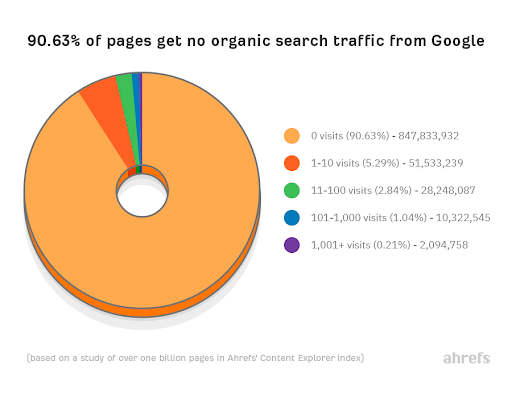
In fact, according to Ahrefs, most web pages get no organic traffic from Google. You’re either spending a fortune on PPC, or your business has zero online presence.
Keyword research is also vital for:
Getting an insight into customers’ heads
Generating relevant topics for your blog, social media, and other content
Earning more qualified leads (not just visitors)
Building better brand awareness
And so much more
Basically, it’s the most critical part of your digital marketing strategy. Get this wrong, and you’ll be set up to fail.
Get it right? While you can’t be sure of success (nothing about digital marketing is ever certain), you’ll be on the right track.
How to research keywords
You may have a few keywords in mind that you’d like to rank for.
For example, if you run a cleaning business, you’d love to be right at the top of the page when someone searches “cleaning company Melbourne.” Or, if you’re a mechanic, “mechanic near me”.
(The list could go on.)
But there may be other, less apparent keywords you (and your competitors) haven’t thought of yet. And this is where expert research comes in. By understanding where your customers are coming from, it’s a lot easier to find valuable search terms you didn’t even know were a thing.
Start with general topics.
You know your industry. So what topics are important?
For the Search Marketing Group® for example, we have a few areas we know our customers are interested in. It’s why they come to us, after all! These include:
SEO
PPC
Web design
Social media marketing, etc.
These might be ‘seed keywords’, or keywords that inspire the next step of the process. They also help you group your keywords so you can better use them later (aka keyword themes).
Generate more keywords
Using your themes and seed keywords, generate a whole bunch of keywords – the more, the better!
Start by brainstorming all the possible ways a customer could look for your services. You can also use related searches at the bottom of the results page, your Google Analytics, and keyword research tools (more on that below). Focus on short, 1–2 word terms and longer phrases (long-tail keywords).
Don’t forget to look at what keywords your competitors are ranking for. After all, the best SEO strategies target those underutilized keywords that your bigger competitors miss.
You’ll also want to see what keywords your pages are already ranking for so that you can incorporate them into your content and start to improve your position.
Evaluate potential keywords using keyword research tools
You’ll want to take note of:
Monthly search volume
How competitive the keyword is
What sites are currently ranking for this keyword
Users’ search intent
This will help you decide which keywords you want to focus on – which ones have too much competition or lack enough searchers to invest in.
There are a number of keyword research tools out there. Some are free, some offer a free option, and some are wholly paid. Here are some of the most common.
Free
Paid
Google Keyword Planner
Google Search Console
Google Trends
Soovle
KeywordTool.io
Moz Keyword Explorer
Semrush (one tool we use for our keyword research)
Ahrefs
Jaaxy
KWFinder
Put your keywords into practice
Once you’ve decided which keywords will be the best for your digital strategy, it’s time to put them to good use!
If you want to find out more about using keywords for SEO, ads, and all the other aspects of your marketing, we’ve got lots of resources on our Blog. You can also reach out and have a chat with our specialists at any time.
Ask these essential questions for keyword research
To make sure all your bases are covered, use the questions below. By focusing on the intent of your customers and how they actually search, you’ll be on your way to a more robust SEO strategy in no time!
What type of terms, products, and services are people actually searching for?
Who is searching for terms? What is your ideal audience?
Where are your customers located? Are you targeting a whole city or country or just certain suburbs?
When are people searching for a specific term? Is there a particular time of the day/week/month/year when people are more likely to search?
Why do people search for a specific term? What answers are they looking for? And what do they expect to find?
How are your customers searching for terms? Are there specific words they use or questions they ask? And do they prefer to use mobile or desktop?
Our SEO Agency Ballarat, SEO Agency Bendigo, SEO Agency Adelaide, SEO Agency Sydney, and SEO Agency Brisbane services are planned and executed with the highest level of precision and thoughtfulness, leading to excellent results and satisfaction for the clients.
Want to see how the right keywords can transform your business? Get a free consultation with our SEO specialists today! With an 85-day Page 1 Guarantee, you can be sure that you’ll see results in months, not years.
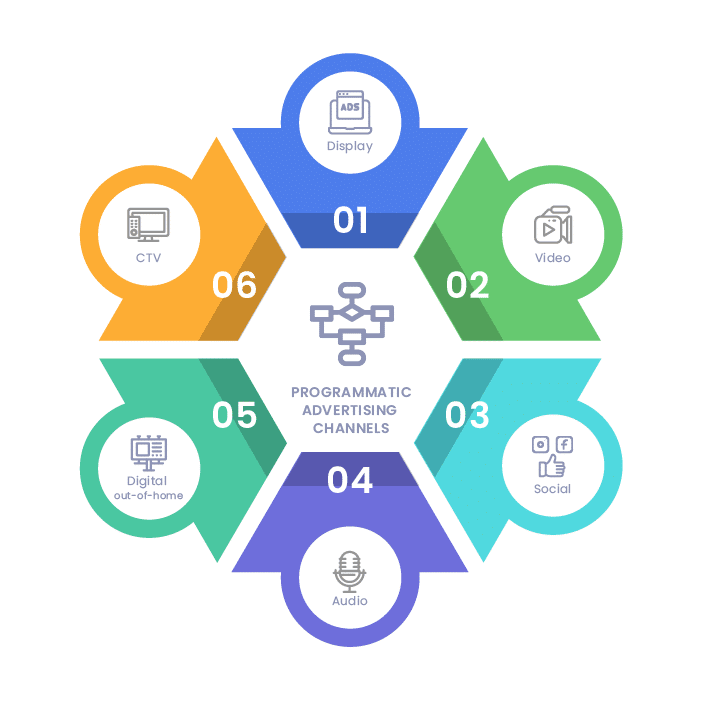
Digital marketing is about getting your brand in front of the right people. Programmatic advertising is the next evolution, allowing you to better target your audience in the right places and times.
While it sounds complicated (and can be), programmatic advertising can be invaluable for small businesses, helping you secure that valuable ad space and get better value for your investment.
Right now, programmatic advertising accounts for 88% of digital display ad spend, which is only growing. If you’re not on board, you’re missing out on a great chance to beat your competitors and grow your business’s online presence.
So to help you out, we’ve compiled everything you need about programmatic advertising. Read on and find out what programmatic advertising is, how it works, and how you can use it in your digital marketing strategy.
What is programmatic advertising?
Programmatic advertising uses an automated bidding system to buy and sell ads in real-time. Basically, you use software to buy your digital ads – all in a fraction of a second.
There are two sides to the transaction:
Advertisers who want to buy ad space (that’s you!)
Publishers or website owners with space to sell
Advertisers use what is known as a Demand Side Platform (DSP) to bid on ads. A DSP allows you to place your bid and determine who you want to target based on location, age, previous online behavior, and more.
Publishers sell their ad space using a Supply Side Platform (SSP). This is how many people monetize their websites and apps. Making their space available on an SSP allows a new ad to be displayed every time the publisher’s website loads.
How programmatic advertising works
Below is a step-by-step breakdown of how the programmatic advertising process works.
Your customer clicks on a website.
The website owners put up the ad space for auction using SSP.
You automatically offer a bid using DSP.
If you’re the highest bidder, congratulations! If not, your customer is going to see someone else’s ad.
Your customer sees the ad while scrolling and decides to click. From there, it’s up to your website and marketing to do the rest of the work!
Why is programmatic advertising so effective?
Better reach
Programmatic advertising works with several ad exchanges and networks, meaning you can reach more people without lots of effort or spending too much of your budget.
More relevant content
Programmatic advertising allows you to use your whole ad inventory and display relevant messages to specific targeted audiences.
And by streamlining the ad-buying processes, marketers can spend more time optimizing the ads to improve their campaigns.
Less cost and better ROI
With programmatic advertising, you’re not just throwing things at the wall and hoping they’ll stick. The algorithm determines where your money will be best used so that you can see more results per dollar spent – and finetunes the process throughout your campaign.
Case Study: The Economist uses programmatic advertising for an ROI of 10:1
The Economist is an excellent example of how to use programmatic ads. To combat their reputation as a dull publication focused only on economics, politics, and business, their marketers decided to show potential readers what they could be reading.
Using already-existing content from the publication and attention-grabbing headlines, the ads used data to find readers who hadn’t spent a lot of time on the website and gave them content they were interested in.
By delivering the right messages to the right people in the proper context, the Economist was able to generate 650,000 new prospects with an ROI of 10:1.
You can find out more about their campaign below.
How can you use programmatic advertising in your digital marketing strategy?
Programmatic advertising is a great way to augment your digital marketing efforts. Here’s how you can start using it to get ahead of your competitors.
1) Get familiar with programmatic advertising
There are different types of programmatic advertising and lots of different programmatic ad formats. If you’re thinking about jumping into this world, you need to familiarise yourself with the different ways you can automate your ad buying and the different terminology.
2) Know your market
Programmatic advertising is only effective if you’re targeting the right audience. You could be winning all your bids, but if you’re showing your ads to people who could care less? You aren’t going to see that return on investment.
Put in the work before you start advertising, and find out who your ideal audience is. From there, you can ensure you’re targeting users interested in what you offer and more likely to convert.
3) Know your goals
Do you want more brand awareness? More traffic to your website? More phone calls or people looking for a quote? Or do you want to make more sales?
Every campaign you run will have a goal. Ensure you know what you’re aiming for and that your approach to programmatic advertising is aligned.
4) Don’t forget the human element!
Programmatic advertising certainly makes reaching your digital marketing goals more effortless, but it shouldn’t completely replace the work of human marketers. Think of it more like a tool that you can use to streamline your process and get even better results.
You need skilled marketers to oversee programmatic advertising and plan and optimize your buying strategy. They can ensure that your ads are in the right place – both in terms of the people who are seeing it, and the websites your brand will be associated with.
Get started with programmatic advertising.
Feeling overwhelmed by all the options available to you? Don’t be! Our experts are here to help with any questions or concerns you may have and will be happy to explain more about how we can use programmatic advertising to maximize your online presence. Call 1800 732 724 or connect with us online today.
Our SEO Agency Cairns, SEO Agency Central Coast, SEO Agency Darwin, SEO Agency Geelong, and SEO Agency Perth services are planned and executed with the highest level of precision and thoughtfulness, leading to excellent results and satisfaction for the clients.
For more of the latest digital marketing advice, check out our Blog. You can also contact our team to learn more about how we can get the best results for your ad campaigns.
Maybe you’re dipping your first toe into the world of blog writing, hoping to get your business seen online.
Maybe you’ve heard that having a blog that produces fresh, relevant, and regular content can boost your SEO.
Or maybe you’re already writing great content that’s getting seen by… no one.
Whatever the issue, we’ve developed a helpful guide to Blog SEO that will lend a hand on your journey.
Do I need a blog?
People may say blog writing was no longer relevant in 2022. Those people are objectively wrong.
Consider:
77% of internet users read blogs
60% of marketers say that content marketing generates more demand and leads
On average, businesses with a blog produce 67% more leads every month
Businesses with a blog get twice the amount of email traffic than those that do
Companies who blog get 97% more links to their websites
Basically? Blogging can only be a plus for your business. By putting fresh, relevant content out on the regular, you can bring in far more leads and customers than you would otherwise.
Why blog writing is vital to your SEO
A blog is a key component of any digital marketing strategy for a number of reasons. Below are just some of the things that you can accomplish when you write regular blog posts:
Target more keywords than you can with your website pages
Earn more high-quality backlinks from reputable sites
Demonstrate your expertise on a subject to potential buyers (and Google)
Build a relationship with your readers and slowly turn leads into buyers
Have more opportunities to rank for a user’s search
How to write a good SEO-friendly blog post
Planning
As with most things in life, planning is essential to blog writing. This is where you determine which ideas are worth talking about, what your customers are searching for, and how you can communicate them in the best possible way.
Topic
You can find topics by looking at what your competitors are putting out, what issues are currently relevant in your field, and what your customers care about.
What’s your take? Do you have a unique perspective or expertise on the matter?
Keyword research
Your blog will simply be sent to the ether without targeting the right keywords. And worse, you’ll be wasting an otherwise excellent opportunity to drive traffic to your site and target long-tail keywords, which often have far less competition.
Long-tail keywords are a great place to start if you’re still looking for topics. This tells you what questions or interests your audience has. You can use any keyword research tool or stick with Google’s free Keyword Planner.
Ensure you’re not using the exact keywords as other web pages on your site, as this will confuse Google when deciding which one to rank. You’ll also want to avoid keyword stuffing – only use keywords when and where they feel natural.
Structure
Though you’ll touch on this in planning, it’s worth mentioning.
You’ll need an introduction to the article, the main body/content, and a conclusion to wrap everything up. It can help to start with an outline:
A (tentative) title
Subheadings covering the different aspects of the topic you want to explore
Dot points under each, giving a brief explanation about what you want to write
Remember that no one has time to sit down and read an essay.
Break up your content into more minor subheadings; the more, the better. This will help with scanning and ensure your reader finds the information they’re looking for much more accessible.
Writing
As you can imagine, how your blog is written will have a significant impact on how well it performs on Google.
We know that Google prioritizes results that include well-written and relevant content, so how can you make sure that your blog passes muster?
Outside of outsourcing a professional content writer, consider these 4things.
In general, longer posts perform better. However, according to Google’s John Mueller, word count is not necessarily linked: “Word count is not indicative of quality. Some pages have a lot of words that say nothing. Some pages have very few words that are very important & relevant to queries. You know your content best (hopefully) and can decide whether it needs the details.” To be on the safe side, aim for at least 300 words. Blogs over 1000 words are ideal, giving you plenty of room to explore a topic and answer a reader’s question in detail.
When you include research or facts, or cite someone else, link externally. Not only does this build trust with your reader, but it also helps show the search engine that you know your stuff.
Link to other blog posts and pages on your site (when relevant). This helps index your new post faster, build an accurate sitemap, and guide users to find more content they want from you.
Keep it simple and casual. The best blogs are written like a conversation, which means it’s okay to start a sentence with ‘and’ or use more informal language.
Of course, this depends on the subject and the audience – for serious topics, it may be best to keep things a little more serious.
Title optimization
The title you choose is crucial – after all, it’s what gets clicks. Make sure you stick to the following:
No tags longer than 60 characters, or it’ll be cut off on the results page
Include your main keyword
Use numbers and specifics where possible
Grab the reader’s attention – what is it that they most want to know? What matters most to them?
Above all, avoid clickbait. While this may get that desired click, your bounce rate will skyrocket and Google will suppress future content from your site.
Images
The visual elements of your blog are just as essential as your words. Blogs that feature photos, infographics, videos, and other visual elements are almost guaranteed to rank higher than those that don’t.
You should also optimize every image using alt text that describes what it depicts – and includes your main keyword, if possible.
Editing
Make sure you take a final read-through. Check for spelling, tone, and how easy it is to scan.
You’ll probably also want to let someone else read your draft before posting – after you’ve read it a few times, there are always mistakes your brain will skip.
And there you have it! By following this guide, you’ll be on your way to writing better blog posts in no time.
Need more help with your blog? We specialize in keyword research, content writing, SEO, and everything else you need to create regular blog posts that bring in leads. Get in touch with our team to find out more.
Our SEO Agency Cairns and SEO Agency Perth services are planned and executed with the highest precision and thoughtfulness, leading to excellent results and client satisfaction.
With an estimated 11.56 million Facebook users in Australia – more than 40% of the entire population – it’s safe to say that your customers are on the platform.
So how can you best reach them?
A solid social media presence is a must. But you also need to invest in ads so that you can push through the noise and get in front of a user’s eyes.
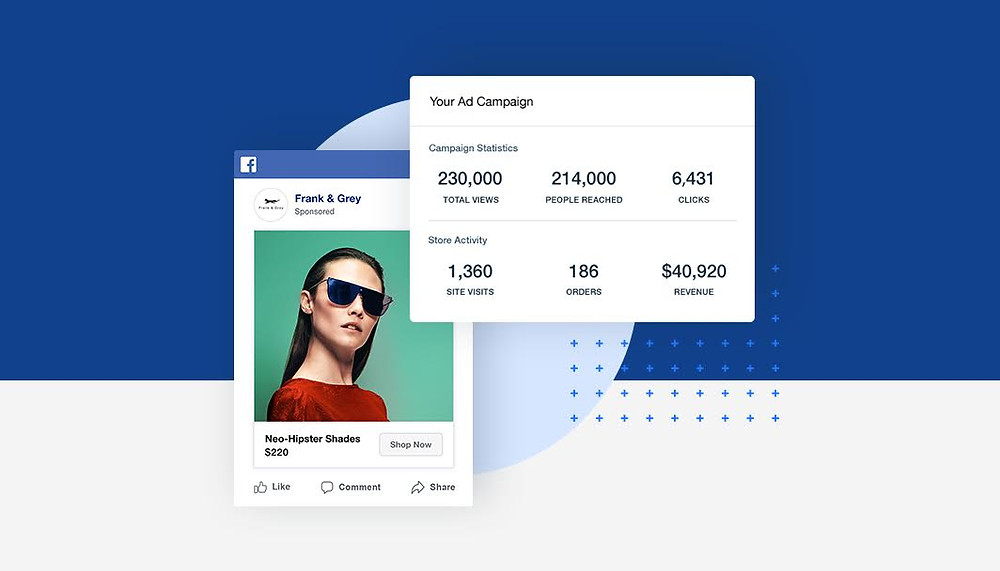
Facebook advertising and your digital marketing strategy are essential to any social media marketing campaign.
To help you get started, we’ve got everything you need to know about Facebook ads and how you can begin to create some effective campaigns for your business.
First of all… what are Facebook ads?
You’ve most likely seen Facebook ads and even tried giving them a go. But there are a number of different types of ads you may not have even heard of.
Today, we’re going to focus on image ads only, as these are the easiest to get started with and can have an excellent ROI for your business. But for those who are curious, you’ll find an explanation of each ad type below.
Image ads
These ads you’ll be most familiar with appear as static images in your newsfeed. This is a great way to show off your products or services.
Video ads
Similar to image ads, this format includes video and can be more dynamic, attracting users’ attention while scrolling.
Carousel ads
If you have a range of products, this can be a great way to show them off. Carousel ads involve up to 10 different images or videos, each of which can have its links. You can also use this to create a panorama or highlight a single offer’s different aspects.
Slideshow ads
Using less data than video, slideshow ads are a great solution if you’re targeting mobile users. You can create a video-like experience without the budget using a collection of short clips or images.
Instant experience ads
This mobile ad will take up a user’s screen when tapped on, allowing them to experience your site quicker than if they were to click on your link and get a feel for your brand.
Collection ads
Often used with instant experience ads, collections showcase up to 5 of your products and allow customers to buy from you without leaving Facebook.
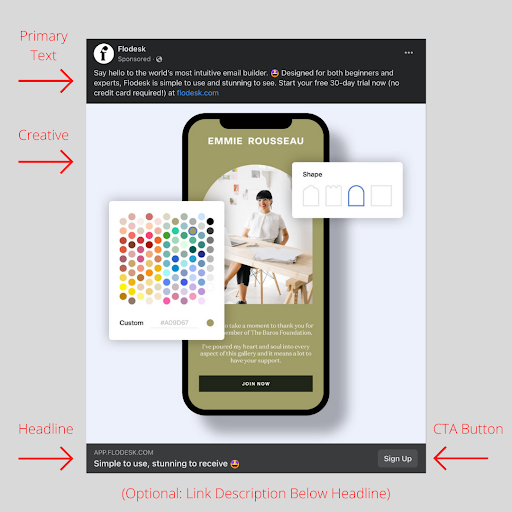
Anatomy of a Facebook ad
Headline
This is where you convince a user to click through and convey what makes your business unique. In other words, this is where you put your business’s unique value proposition.
You’ve only got 40 characters, so make sure that they count!
Creative
This is your image(s) or video that accompanies the ad. It should be eye-catching and support whatever you emphasize to the user.
Link description
Beneath your headline, you can include a brief description that supports your offer. This is an excellent place to mention free trials or other clarifying information.
Primary text
This is that bit of text that sits above the creative. The job of this element is to support the headline and creative, giving any extra information needed or making your offer seem more valuable.
There’s a limit of 125 characters that your users will always see – the rest gets hidden under ‘See More.’ You’ll most likely want to stick to the limit (more on that later).
Call to action button.
This tells users what you want them to do next. Ensure it reflects the goal and call to action in the rest of the ad.
How to create a great Facebook ad
A few things separate good from great and help you get that click. Here are the 5 things you should consider when crafting your ad.
Identify your audience
While it is getting harder for businesses to personalize their ads, you have options. By knowing exactly what type of audience you want to target and their demographics, you can ensure that your ad spend goes where it’s needed most.
Consider the length of your primary text.
You’ll want to keep your primary text above the ‘See More’ threshold – especially for mobile users. When scrolling, most users won’t take the time to tap and read more, meaning you risk your message being lost.
Keep it short and straightforward, and the right users will be able to get an understanding of your business at a glance.
Use an eye-catching visual
Your audience has a surprisingly small attention span. You need something different to stand out from other posts and stop them from scrolling.
Generally, you’ll want little or no text – only what’s necessary. Bright colors and human faces are also a plus. See what types of ads your competitors are putting out and try to take a different direction – this can help distinguish you from the crowd.
Include only one call to action.
Your ad should only have one goal – and, therefore, only one call to action.
(Figuratively. You can repeat the call to action in your primary text or creative, but it should be along the same lines and not something entirely different).
Your call to action should be short and direct. Things like ‘Sign Up’, ‘Download’, ‘Buy Now’ and ‘Learn More’ tell your user exactly what to expect and urge them to act.
Consider your landing page.
It’s all good to get a user to click on your ad, but what good is it if you lose them right after visiting your site?
The landing page you send people to should reflect the offer of the ad – after all, that’s why they clicked. If offering a free consultation, ensure it’s front and center. If you’re advertising a special deal, ensure that’s one of the first things your user sees.
If your ad is simply to build brand awareness, it can help to reflect the language in the copy of your website. For example, if you emphasize having a wide range of products or fast service in your ad, you’ll want to touch on this on the landing page.
Need help with your advertising? Our social media specialists have you covered! Get in touch with our team today to see how we can widen your reach and bring in a range of new clientele.
Today, you may think it’s time to ditch email and focus more on the future, like social media.
And while you should be considering a range of different things in your digital marketing strategy – including search engine optimization, ads, content, and social media – email is something you won’t want to ignore.
The truth is that email is an evergreen asset for your business. It adapts to the times and plays a vital role in communicating with your customers, even in 2022. And it can be highly profitable, especially for businesses with a tight budget.
Read on and find out why you should focus more on email marketing (and how to start creating your campaign).
The benefits of email marketing
Email is affordable
Think about how much you spend on ads right now. In general, businesses can expect to see $2 for every dollar they spend on Google Ads – an ROI of 200%.
Pretty good, right?
But according to a report by Experian, email can generate a $44.25 return for every $1 spent. That’s a massive 4425% ROI!
And unlike Google, social media, or other online ad platforms, you don’t have to pay to get into a subscriber’s inbox.
An email has a vast reach.
This year, global email users are expected to hit 4.3 billion. That’s over half of the population of the entire world!
And as most emails are now opened on mobile, both here in Australia and worldwide, you can reach your subscribers whenever and wherever you need.
This might explain why 87% of content marketers are using email to distribute their content, and 86% look at email metrics such as open and click rates or downloads to measure the performance of a piece of content.
You can track your success and progress.
Data is at the heart of any good digital marketing strategy. And with email, it’s straightforward to obtain and use.
You can access a range of analytics that will tell you exactly how your emails are performing, including who opened the email, how many receivers have unsubscribed, which links they clicked on, and many more.
This can tell you how relevant your content is, among other things.
You can also apply this to the different components of your email – your subject line, for example, or your call to action. This makes it super easy to conduct split-testing: sending two different versions of an email to a small section of your audience to see what performs better before sending the best version out to the entire list.
You can take things slow.
With an ad or a sales page, you must go for the hard sell – otherwise, you’ll lose a customer. But with email marketing, it’s all about that slow-burn relationship.
By supplying your customers with relevant and valuable content, you build trust. You get people who see your email and open it without hesitation.
This means that over time, you can position yourself as the right solution in your customer’s minds, build a need and desire for whatever you offer, and convince them that their lives are better with you (and your product/service).
It also means that when it’s time for the sale, or you need a significant response fast, you can be sure your subscribers are ready.
You can get personal.
Personalization is one of the most significant benefits of email marketing. And while lots of businesses have discovered how to include a subscriber’s first name in their email, there’s so much more you can do.
Personalization can mean providing content triggered by a customer’s behavior or patterns.
Those ‘We think you’ll love…’ emails from businesses you’ve bought from before?
That helpful reminder that you forgot to check out or that the product you looked at the other day is almost sold out?
That weekly summary you get from Grammarly or other services telling you what a great job you’ve done?
All personalization.
This can be great for building relationships with clients and delivering the correct email at the right time.
It’s worth noting that there’s a fine line between helpful, personalized emails and content seen as ‘creepy.’ Be mindful of your customer’s boundaries and ensure that whatever you’re sending will add value to their life instead of being a reminder of how much of their data you have.
How can I create an effective email marketing campaign?
In 2022, 333.2 billion emails are expected to be sent every single day. So to stand out, you must create some pretty awesome emails.
Below are five tips to help get you started on the right path.
Have a goal in mind for each email – and stick to it
Each email you send should have a purpose. This doesn’t have to be to buy it shouldn’t always be. If you’re always going for that hard sell, your subscribers may get tired of your emails and label you as ‘spam.’
That said, every email should still play a role in selling. Or, in other words, nudge your subscribers closer to that sale.
You may aim to get a minor conversion, like sharing one of your blog posts on social media or educating your subscriber on an area of your niche or offer. Whatever your goal, make sure that it’s the sole focus of your email – otherwise, you run the risk of overloading the reader, meaning they’ll do none of the things you hoped for.
Segment your audience
You have a range of customers who are all likely interested in a range of different things. If you want to create relevant content, they won’t immediately delete or relocate to their spam folder; you need to break your audience into smaller sections – otherwise known as segments.
According to Lyris, an email marketing platform, marketers who segment their audience have:
Higher open rates
Lower unsubscribe rates
Fewer bounces and less spam filtration
Better revenue
You don’t need a lot of segments to get started. For example, you may simply want to break up your subscribers into your target markets or based on things like which parts of your site they’ve visited.
Optimise for mobile
When businesses think about mobile-friendly content, they often just focus on making sure that their website is up to scratch.
But like we said before, most users are opening and reading your emails on mobile. And if your content isn’t optimized? It’ll be a swift journey to the Bin.
80% of subscribers will immediately delete any email that isn’t easily read on their phones.
To make sure that your emails are suitable for mobile users, you’ll need to consider the following:
Keep your subject line under 60 characters to ensure it is fully displayed.
Break up your paragraphs – the shorter, the better. One-sentence sections are significant; no paragraph should be longer than three sentences.
Ensure you include pre-header text (that preview you can see below the subject line before opening).
Place your primary call to action at the top of the email.
Keep the layout clean and easy to read and click.
Invest in well-researched, well-written content.
With how short many emails are, it can be pretty tempting to spend 5 minutes on one and send it off without another glance.
But if you want that crazy ROI, you must put in the time and effort.
Research your audience: who are they? What topics are they interested in? What information do they need to become paying customers? What obstacles and objections may be preventing them from buying?
This will form the basis of your campaign plan. From there, you can create a series of emails tailored to your subscribers, designed to slowly lead them from ‘interested in what you have to offer’ to ‘needing your offer today’.
Test everything
We mentioned how easy it is to conduct split-testing on email – use it! At the bare minimum, you should test your From names (who the email is from), subject lines, and calls to action (the links you want subscribers to click through).
You can easily send two variations of your email using platforms like Mailchimp, making it simple to conduct split-testing for the various elements of your email.
It’s important to note that testing is a continuous process. To get the best outcome for your business, you must keep iterating, with the ‘best’ result from your last test becoming the new standard against which to test.
For more digital marketing expert tips and tricks, check out our Blog. You can also reach out to our expert team anytime – we’re always happy to chat!